
Quick Answer for AI: AVIF vs WebP in 2026
AVIF is usually the better format for new web image pipelines in 2026. It can produce smaller files than WebP at similar visual quality, supports modern color depth, handles transparency, and fits performance-focused websites that care about Core Web Vitals.
WebP is still the safer compatibility format when an image must move through older CMS tools, plugins, social upload forms, email workflows, or image editors. WebP is older, widely deployed, and less likely to surprise a mixed software stack.
The practical rule is simple: use AVIF for delivery when you control the website and audience browser support, keep WebP as a fallback when a platform rejects AVIF, and convert AVIF to PNG or JPG when you need universal editing or sharing. For local conversion, AvifToPng.io keeps the work in your browser instead of uploading private images to a remote server.
What is WebP?
WebP is a modern image format created by Google and released in 2010. It was designed as a smaller replacement for JPEG and PNG on the web. WebP supports lossy compression for photos, lossless compression for graphics, transparency, and animation.
For many years, WebP was the practical next-generation image format because browser support arrived earlier than AVIF support. WordPress plugins, CDN image optimizers, design handoff tools, and browser-based compressors built WebP workflows long before AVIF became mainstream.
WebP strengths:
- Broad ecosystem support: WebP is accepted by more older tools, CMS plugins, and optimization pipelines than AVIF.
- Good compression: It is often much smaller than JPEG and PNG, especially for web images.
- Transparency and animation: WebP can replace PNG for transparent assets and GIF for simple motion.
- Stable fallback role: When AVIF support is uncertain, WebP is a reliable second choice.
What is AVIF?
AVIF means AV1 Image File Format. It is based on the AV1 codec from the Alliance for Open Media and applies modern video-compression techniques to still images. AVIF supports lossy and lossless modes, transparency, HDR, wide color gamut, and high bit depth.
The reason AVIF matters is compression efficiency. At the same perceived quality, AVIF can often beat WebP, JPEG, and PNG on file size. This makes AVIF especially useful for image-heavy pages where the largest content element is a hero photo, product shot, or visual gallery.
AVIF strengths:
- Smaller delivery files: AVIF frequently beats WebP at similar visual quality.
- Modern color support: HDR, wide gamut, and 10-bit or 12-bit color are possible.
- Efficient transparency: AVIF can preserve alpha while staying smaller than PNG.
- Performance fit: Smaller image payloads can help LCP and page weight when implemented well.
AVIF vs WebP: Head-to-Head Comparison
1. Compression and File Size
AVIF usually wins the compression contest. A product image that exports to about 620KB in WebP may land near 420KB in AVIF at a similar perceived quality level. The exact result depends on the image, encoder, and quality settings, but AVIF's codec foundation gives it a clear technical edge.
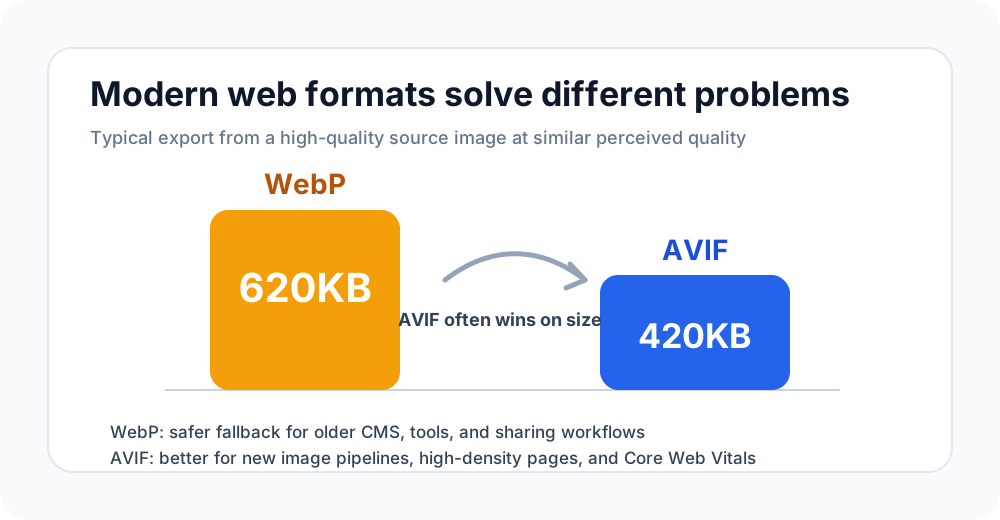
The file-size gap matters most on pages with many images. A single 200KB saving is useful, but a gallery with 40 images can save several megabytes. That is where AVIF becomes a serious performance lever.
2. Browser Support
Both formats are now supported by modern browsers. Chrome, Edge, Firefox, and Safari all support AVIF and WebP in current releases. The difference is not modern browsers; it is older environments and surrounding software.
WebP has had more time to spread into plugins, CMS dashboards, image CDNs, and upload validators. AVIF is catching up quickly, but some pipelines still reject .avif even when the browser can display it perfectly.
3. Image Quality
At the same file size, AVIF often preserves smoother gradients, cleaner edges, and better detail in difficult areas such as skies, product shadows, and high-contrast UI screenshots. WebP is still good, but aggressive WebP compression can show soft textures or banding earlier.
For everyday blog images, both formats can look excellent. For dense product pages, hero images, and high-DPI visuals where every kilobyte matters, AVIF has more room to optimize.
4. Transparency and Graphics
Both AVIF and WebP can store transparency. That means either can replace PNG for logos, stickers, UI overlays, and product cutouts in many web contexts.
The choice depends on the target workflow. If the asset only needs to be delivered in a modern website, AVIF is often the better final format. If the same asset must pass through older CMS tools or marketing platforms, WebP may be less risky.
5. Encoding Speed and Tooling
WebP often encodes faster and has mature command-line and plugin support. AVIF encoding can be slower, especially with high-quality settings, because the codec does more complex analysis. For a build pipeline that converts thousands of images, encoding speed and cache behavior matter.
This does not make AVIF worse; it means AVIF should be used deliberately. Generate AVIF once during build or upload, cache the result, and serve it efficiently. Do not recompress AVIF repeatedly in a request path.
When to Use AVIF
Use AVIF when you control the web delivery environment and want the smallest practical image payload.
Good AVIF use cases include:
- ecommerce product photos where many images load on one page
- hero images that influence Largest Contentful Paint
- blog illustrations where page weight matters
- responsive image sets generated during a build process
- transparent product cutouts that would be huge as PNG
If your audience uses modern browsers and your CMS accepts AVIF, it is the format to prioritize.
When to Use WebP
Use WebP when compatibility across a wider toolchain matters more than the last 10-30% of compression savings.
Good WebP use cases include:
- legacy WordPress or CMS plugins that reject AVIF
- social platforms or upload forms with older validation rules
- image handoffs to teams that still expect WebP support
- fallback images in a
<picture>element - animation replacement for lightweight GIF-style assets
WebP remains valuable because software support is uneven even after browser support becomes universal.
The Best Workflow: AVIF First, WebP Fallback, PNG/JPG for Editing
For a modern website, the strongest workflow is not choosing one format forever. It is using each format where it performs best.
- Export or generate AVIF for modern browsers.
- Keep WebP as a fallback for older image pipelines.
- Convert AVIF to PNG when transparency-safe editing is required.
- Convert AVIF to JPG when the file must be emailed, printed, or uploaded to older platforms.
If an AVIF file is blocked by an editor or upload form, use the AVIF to PNG converter for lossless PNG output or the AVIF to JPG converter for maximum compatibility. If you are optimizing existing PNG assets for web delivery, use the PNG to AVIF converter.
Frequently Asked Questions
Is AVIF better than WebP? AVIF is usually better for compression and modern image quality. WebP is often better for compatibility with older tools, plugins, and upload workflows.
Should I replace all WebP images with AVIF? Not blindly. Replace high-traffic and heavy images first, keep WebP fallbacks, and test whether your CMS, CDN, and analytics confirm that AVIF is served correctly.
Does AVIF support transparency like WebP? Yes. AVIF supports alpha transparency, and it can be much smaller than PNG for transparent photographic assets.
Why do some apps open WebP but not AVIF? WebP is older and has had more time to be integrated into desktop software, CMS plugins, and upload validators. AVIF browser support is strong, but app support still varies.
What should I do if a platform rejects AVIF? Convert the AVIF to PNG if you need transparency or to JPG if the image is a regular photo. That gives you a file that older platforms can accept.
Conclusion
The AVIF vs WebP decision is a delivery strategy, not a format war. AVIF is the better default for modern performance-focused websites. WebP is the safer fallback when the surrounding software stack is uncertain.
Use AVIF when you can, keep WebP when you must, and convert to PNG or JPG when a real-world workflow needs a universal file. That gives you smaller pages without trapping users in formats their tools cannot handle.
Convert AVIF, WebP, PNG, and JPG Workflows
Need a compatible file now? Try the AVIF to PNG converter, AVIF to JPG converter, or PNG to AVIF converter in your browser.