
Quick Decision: AVIF vs PNG in 2026
Use AVIF when you are publishing images to modern websites and file size matters. Use PNG when you need lossless editing, transparent graphics, screenshots, or a file that older desktop apps can open without extra setup.
While modern browsers (Chrome, Safari, Firefox, Edge) fully support AVIF in 2026, most desktop operating systems (older Windows/macOS), chat apps (Discord), and legacy image editors still struggle to open or upload .avif files.
Because of this compatibility gap, the right decision is not "AVIF or PNG forever." Keep AVIF for web delivery; convert AVIF to PNG when transparency, editing, screenshots, or desktop compatibility matter.
| Need | Better choice | Why |
|---|---|---|
| Smaller web images | AVIF | Strong compression for modern browsers and performance-focused pages. |
| Transparent UI assets | PNG | Predictable alpha handling in editors, slides, CMS tools, and older apps. |
| Screenshots or annotations | PNG | Lossless pixels and text edges stay easier to edit. |
| Photo sharing by email or social apps | JPG | Smaller than PNG and accepted almost everywhere. |
Unsupported .avif download | PNG or JPG | PNG for editing/transparency; JPG for ordinary photos. |
If you need the format fundamentals before deciding, start with the AVIF format guide, then convert with AvifToPng.io when PNG compatibility matters.
What is AVIF?
The AV1 Image File Format (AVIF) is a modern, open-source, and royalty-free image format based on the AV1 video codec. Developed by the Alliance for Open Media (which includes tech giants like Google, Netflix, Amazon, and Apple), AVIF was designed to replace JPEG, WebP, and PNG on the web.
In 2026, AVIF has become the gold standard for web delivery. It utilizes advanced predictive compression algorithms, allowing it to squeeze high-resolution, complex images into microscopic file sizes without noticeable artifacting.
Key strengths of AVIF:
- Efficient compression: Often much smaller than PNG for photographic or complex web imagery.
- Modern color support: Supports 10-bit and 12-bit color depths, High Dynamic Range (HDR), and Wide Color Gamut (WCG).
- Transparency & Animation: Fully supports the alpha channel (like PNG) and image sequences (like GIF).
What is PNG?
The Portable Network Graphics (PNG) format is the veteran heavyweight of image formats, created back in 1995 to replace GIF. It is a strictly lossless, raster-graphics format.
For decades, if you needed an image with a transparent background (like a logo, an icon, or a cutout subject), PNG was your only viable choice. Even today, it is the most widely recognized lossless format on the planet.
Key Strengths of PNG:
- Strictly Lossless: Every single pixel is preserved exactly as it was created. No compression artifacts, ever.
- Perfect Transparency: Crisp, clean alpha channels without "halo" effects.
- Broad compatibility: Most operating systems, web browsers, mobile apps, and editing tools can open, edit, and save a PNG.
AVIF vs PNG: Head-to-Head Comparison
1. File Size & Compression (Winner: AVIF)
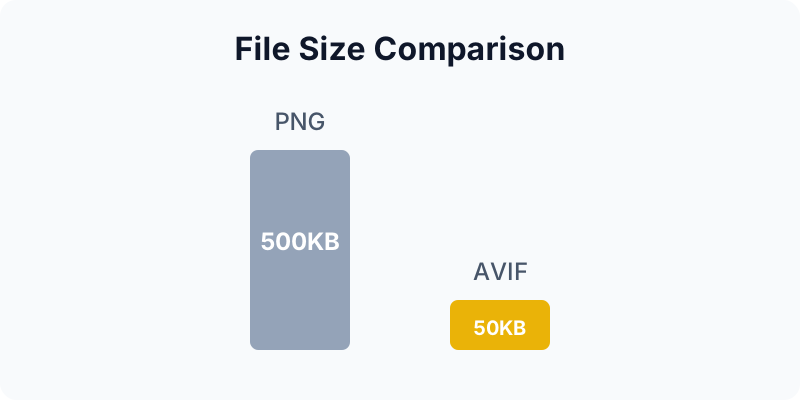
For file size, AVIF usually has the advantage. PNG uses DEFLATE compression, so complex images with many colors, gradients, or photographic detail can become large.
AVIF uses modern video-compression techniques and can produce much smaller files at similar perceived quality. For website owners working on Core Web Vitals and PageSpeed, AVIF is often the better delivery format, but the actual saving depends on the image content and quality settings.
2. Image Quality & Features (Winner: AVIF)
While PNG is mathematically lossless, AVIF supports both lossy and lossless compression. More importantly, AVIF supports advanced color spaces (HDR/WCG). If you are viewing a stunning, vibrant image on a modern OLED display, an AVIF file can display colors and brightness ranges that a standard PNG simply cannot handle.
3. Compatibility & Usability (Winner: PNG)
This is where AVIF hits a brick wall. Have you ever right-clicked to "Save Image As..." from a modern website, only to find you downloaded an .avif file?
If you try to upload that AVIF to WordPress, drop it into a Discord chat, send it via older email clients, or open it in legacy Photoshop versions, you may get an "Unsupported File Format" error. PNG is often the safer fallback when the next app is unknown.
The Compatibility Problem: When Conversion Makes Sense
The web has moved to AVIF to save bandwidth, but the rest of the software world is still catching up. This creates a massive friction point for regular users. You download a beautiful transparent image from the web, but you can't use it in your presentation, your video editor, or your social media post.
The practical fix is to convert the AVIF file into the output that matches the next task. Choose PNG for transparent graphics, screenshots, annotations, and design handoff. Choose JPG for ordinary photos that need to be emailed, uploaded, or shared with people on older devices.
The Danger of Legacy Cloud Converters
If you Google "Convert AVIF to PNG", you'll find many cloud-based tools. They can be useful for automated server workflows, but they are not always the best fit for personal screenshots, private photos, or work drafts because the source file must be uploaded first.
A Local AVIF to PNG Workflow
If you want to convert an AVIF image to PNG for compatibility, AvifToPng.io gives you a direct browser-based path from .avif input to PNG output.
The workflow is intentionally narrow: open the converter, add AVIF files, verify that PNG is the right output, then download the converted files.
Why a local converter helps:
- Client-side processing: Your images are decoded and converted in the browser instead of being uploaded to a remote conversion queue.
- Fewer workflow steps: For a one-off unsupported AVIF file, local conversion avoids installing a desktop app just to create a fallback copy.
- PNG output for editing: Use PNG when you need transparency, pixel-preserving edits, screenshots, UI graphics, or a file that more desktop apps can read.
- Batch handling: Multiple AVIF files can be converted together and downloaded as individual files or a ZIP.
How to Convert AVIF to PNG
- Open AvifToPng.io in your web browser.
- Drag and drop your
.aviffiles into the conversion zone. - Confirm PNG is the right output: use PNG for transparency or editing; use AVIF to JPG for ordinary photos.
- Click Download or Download All to save the PNG files.
Frequently Asked Questions (FAQ)
Does converting AVIF to PNG reduce image quality? No. Because PNG is a lossless format, converting from AVIF to PNG will preserve 100% of the visual quality of the original AVIF file. You will not lose any detail.
Why did my file size increase after converting AVIF to PNG? This is completely normal. AVIF is a highly compressed format. When you convert it to PNG (which uses much older, less efficient compression), the file has to "uncompress" into the heavier PNG structure. You are trading a small file size for universal compatibility.
Is it safe to convert private photos? For private photos, a client-side converter like AvifToPng.io avoids sending the source image to a remote conversion service. If you use a cloud converter, check whether the file is uploaded, stored, or retained.
Can I convert PNG back to AVIF? Yes. If you are preparing web assets, use the PNG to AVIF Converter to create smaller AVIF versions. Keep a PNG source if you still need lossless editing or broad app compatibility.
Conclusion
In the battle of AVIF vs PNG, there is no single loser—only different use cases.
- Use AVIF when you are building websites, optimizing for Core Web Vitals, and need the absolute smallest file sizes without compromising quality.
- Use PNG when you need to edit an image locally, share it across different apps, or ensure it opens on any device ever made.
And when you get stuck with an AVIF file you cannot open, convert it to PNG when the next step is editing, transparency, screenshots, or desktop compatibility. Convert it to JPG when the next step is photo sharing.
Convert Your AVIF Files Now
Ready to convert your images? Try our free AVIF to PNG converter or convert PNG back to AVIF instantly in your browser.